Most AI tools for Instagram promise the same thing. Type a topic, get a post, hit publish. And most of what comes out sounds exactly like that: a caption full of “unlock”, “game-changer” and a wall of hashtags nobody asked for.
So when a free pack of 13 Claude skills for Instagram showed up on GitHub, the interesting part wasn’t that it writes Reels and captions. Lots of things do that. The interesting part was how openly it talks about what it can’t do.
This guide walks through all 13 skills, what each one is actually useful for, how to install them step by step, and the limitations you should know before you rely on them.
Quick note before we start: these skills are not an official Anthropic product. They were built by an independent developer, Jake Schincariol, and shared for free under the MIT license. They run inside Claude, which is why people call them “Claude’s Instagram skills”.
What are Claude Instagram skills?
A Claude skill is a folder of instructions that teaches Claude how to do one specific job well. Instead of explaining your process every time (“write a hook, keep it short, don’t start with hi guys…”), the skill already holds that process. You type a slash command like /ig-caption and Claude follows it.
This pack, called instagram-agent-skill, has 13 of them. Each one covers a different part of running an Instagram account: Reels, captions, carousels, Stories, your profile, comments, DMs, planning and reviewing what worked.
A few things stand out about it:
- It’s free and open source. MIT license. You can use it, edit it and share it.
- No API key, no signup, nothing to connect. It doesn’t log into your Instagram.
- Six of the skills come with small Python scripts that actually run on your computer, like a hook scorer and a caption checker. They use only Python’s built-in tools and don’t send your text anywhere.
- It never posts for you. Every skill ends with a copy-ready block. You review it and post it yourself.
Why these skills are worth a look
There are three reasons this pack is more useful than a generic “write me an Instagram caption” prompt.
1. It focuses on the parts that decide performance
The first two seconds of a Reel. The first line of a caption before “… more”. The cover of a carousel. The pack spends most of its effort on exactly these moments, because that’s where most posts quietly fail.
2. It’s built around your voice, not a template
Every skill reads a file called voice.md: how you talk on camera, words you’d never say, who you’re speaking to, and real numbers you’re happy to share. If a draft needs a number you haven’t given, it leaves a {{your number}} placeholder instead of making one up.
3. It’s honest about its limits
The creator tested his own hook scorer on 74 real short-form hooks and published the result: it’s good at spotting weak hooks, but close to a coin flip at predicting which good hook will go viral. He put that in the README himself. That kind of honesty is rare, and it tells you how to use the tool properly: as a filter, not a fortune teller.
All 13 Instagram skills explained
Here’s every skill, what it does, and where it’s actually useful. The commands are exactly as they appear in the repository.
Content creation skills
1. /ig-reel: turn one idea into a Reel script
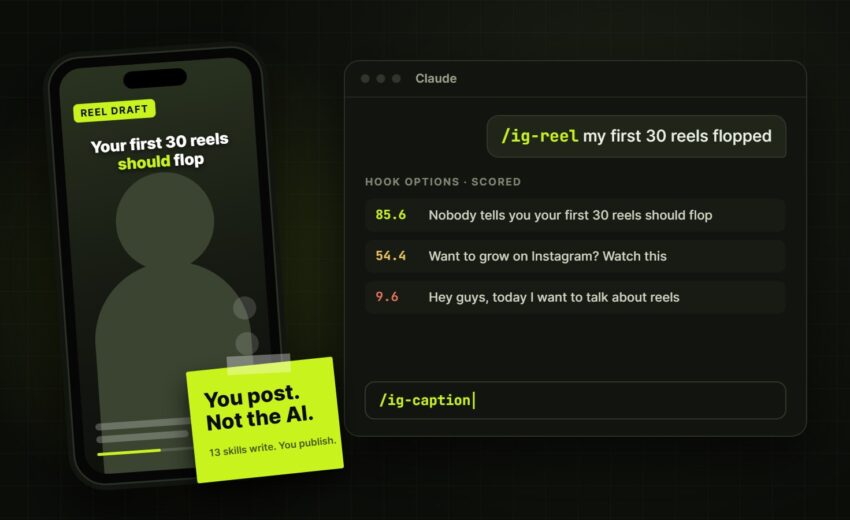
Give it a raw idea and it writes three hook options based on 26 hook formulas, scores them, then writes the spoken script, the on-screen text and a timed beat sheet.
The beat sheet is the clever part. It estimates how long each line takes to say and flags problems like a hook that runs past three seconds or one line that drags on long enough for viewers to leave.
Useful for: creators who record talking-head Reels and keep getting stuck on the first line.
2. /ig-caption: write and check your caption
Writes the caption and then lints it. The first thing it shows you is a preview of roughly the first 125 characters, the part people see in the feed before tapping “more”. It also checks length, hashtag count, whether there’s one clear call to action, and whether your search keywords are present.
Instagram’s hashtag limit may vary depending on account and platform updates. Check the latest Instagram guidelines before publishing.
Useful for: anyone whose caption opens with “Hey everyone!” and loses people before the good part.
3. /ig-carousel: plan swipe posts
Writes the cover (six words or fewer), slide-by-slide copy for 6 to 10 slides, a recap slide and one call to action. It can also build the slides as 1080×1350 HTML pages, which you then convert into images.
Useful for: step-by-step tips, frameworks and checklists that people want to save.
4. /ig-story: plan the day’s Stories
Plans a 3 to 7 frame Story sequence, tells you which sticker (poll, question box, quiz, link) does which job, and where to place the ask so people actually see it.
Useful for: small businesses that want to sell without making every feed post a sales post.
5. /ig-repurpose: one long piece into a week of posts
Paste a YouTube transcript, podcast, newsletter or blog post. It pulls out the claims, numbers, stories and quotable lines, then turns them into a week of standalone Reels and carousels.
Useful for: anyone already creating long content who wants Instagram to stop feeling like extra work.
Research and planning skills
6. /ig-viral: find what’s working in your niche
You pick 6 to 12 accounts and browse them with Claude in your own browser. It ranks reels by how far they beat that account’s normal views, not by raw view count, then names the hook formula and builds a swipe file.
Why that matters: 400,000 views on a 2 million follower account is an ordinary day. 400,000 views on a 4,000 follower account means they found something.
It never asks for your password and never logs in for you.
Useful for: finding content ideas based on evidence, not guesswork.
7. /ig-profile: score your profile out of 100
Scores your name field, bio, link, highlights, pinned posts and grid against a 12-part rubric, then rewrites the weakest parts first.
Useful for: profiles that get views on Reels but don’t turn them into followers.
8. /ig-plan: plan the week
Builds a weekly plan with four to five posts, the format for each, a mix of post types (proof, teaching, opinion, story, offer), and 10 accounts to engage with.
Useful for: the “I have nothing to post this week” problem.
9. /ig-audit: learn from what you already posted
Paste your Instagram insights or screenshots. It ranks posts by outlier multiple (views divided by your own median) and sends per reach, instead of raw views, and tells you what to do more of and what to stop.
Useful for: monthly reviews, or understanding why one Reel flopped.
Engagement skills
10. /ig-comment: comments that sound like a person
Writes comments on other people’s posts using nine comment types, like adding a data point, asking the real question, or respectfully disagreeing. It bans openers like “Great post” and emoji-only comments.
Useful for: your daily engagement round, without sounding like a bot.
11. /ig-reply: handle comments on your own posts
Sorts your comments into six buckets (keyword, lead, substance, question, support, noise) and replies in order of value. It also flags questions worth turning into a reply Reel.
Useful for: creators and businesses who get leads hidden in their comment section.
12. /ig-dm: DMs that get replies
Writes the keyword delivery message (when someone comments a word to get a freebie), first messages, collab pitches and exactly two follow-ups. It openly discourages cold DMing strangers.
Useful for: turning “comment GUIDE” posts into real conversations.
The quality check skill
13. /ig-human: the humanizer
This is the one the creator calls the reason the rest are usable. It cleans a draft in three passes:
- Removes invisible characters (like zero-width spaces) that sneak into AI text and survive copy-paste
- Fixes typography, like converting em dashes and curly quotes
- Replaces 154 stock words and phrases, including Instagram-specific ones like “stop scrolling” and “follow for more”
Then it scores the text on five local checks. Things that need human judgement, like “It’s not just X, it’s Y” patterns, get flagged for you to rewrite instead of being auto-changed.
One honest caveat from the creator: these checks are local and modelled on common detector signals. They are not GPTZero or any other detector, and nobody can promise “undetectable” text.
Useful for: running any caption, script or DM through before it goes out.
Where good AI drafts still need a good plan
All 13 skills make individual tasks faster. But speed only helps if you know what you’re trying to achieve. A perfect caption on a random post doesn’t build an account. What builds an account is a clear content strategy, a realistic posting rhythm, and someone reviewing what’s working every month.
That’s why /ig-plan and /ig-audit are probably the two most underrated skills in the pack. They’re the planning and review loop. If you’re a business owner who’d rather not run that loop yourself, that’s the part of social media management for brands that matters most: planning, publishing and reviewing performance consistently, so the content actually connects to your goals.
How content creators, social media managers and business owners can use them
If you’re a content creator:
Use /ig-reel to get a stronger first line before you record, /ig-caption to check the “… more” cut, and /ig-human on everything. Fill in voice.md properly so the scripts sound like you when you say them out loud.
If you’re a social media manager:
Keep a separate voice.md for each client. Use /ig-plan for weekly planning, /ig-audit for monthly reports, and /ig-reply to triage comment sections quickly. Since nothing posts automatically, the client approval step stays exactly where it is.
If you’re a small business owner:
Start with /ig-profile, because your profile is where people decide whether to follow or message you. Then use /ig-story and /ig-dm to turn followers into real conversations.
Your face, your voice, your positioning
There’s one thing no skill can generate for you: a clear idea of who you are and why people should listen. The voice.md file forces you to write down what you sell, who you’re talking to, and three or four things you believe that some of your audience doesn’t. For many founders and professionals, that’s the hardest part, and it’s worth getting right before you produce more content. If that’s where you’re stuck, building a clear personal brand around your expertise is the step that makes every tool, AI or not, more useful.
How to install Claude Instagram skills (step by step)
There are a few ways to install the pack. Pick the one that matches your setup.
What you need first
- Claude with skills support. The full experience is in Claude Code. The Claude app can also run skills, depending on your plan and settings.
- Python 3 on your computer, if you want the scripts (hook scorer, caption checker, humanizer). Most Macs and Linux machines already have it.
- Git, only if you install manually.
Option 1: Let Claude install it (easiest)
Paste this into Claude:
https://github.com/Jakeschincariol/instagram-agent-skill

Install this skill, then confirm /ig-reel works.
Option 2: Install manually in Claude Code
Open your terminal and run:
git clone https://github.com/Jakeschincariol/instagram-agent-skill.git
cp -r instagram-agent-skill/skills/ig-* ~/.claude/skills/
This makes all 13 skills available in every project.
If you only want them in one project, copy the same folders into that project’s .claude/skills/ folder instead.
Option 3: Install as a plugin
Inside Claude Code, run:
/plugin marketplace add Jakeschincariol/instagram-agent-skill
/plugin install instagram-agent
Option 4: No Claude Code? Use one skill at a time
Open any single SKILL.md file from the repo, paste it at the top of a Claude chat, and Claude will follow it for that conversation. You lose the Python scripts this way, so /ig-reel and /ig-human lose most of their power, but the rest still work.
Step 5: Set up your voice profile (don’t skip this)
- Copy
templates/voice.mdto~/.claude/instagram/voice.md - Fill it in: who you are, who you’re talking to, words you use, words you’d never say, your positions, and real numbers you’re happy to share
- Or the shortcut: send Claude three of your own Reels or captions and say “write my voice.md from these”
Every skill reads this file. Ten minutes here saves you rewriting every script later.
Step 6: Test it
Type /ig-reel with a simple idea, like “the one mistake I see in most Instagram bios”. If you get three scored hooks and a script, you’re set.
Practical workflows you can copy
Here are three realistic ways to combine the skills.
Workflow 1: One idea to a finished Reel
/ig-reelwith your idea → pick the highest-scoring hook- Record it
/ig-caption→ check the feed preview/ig-humanon the caption → clean it up- Post it yourself
Workflow 2: The weekly content routine
- Monday:
/ig-planfor the week’s four to five posts - Each post day:
/ig-reelor/ig-carousel, then/ig-caption - Daily:
/ig-storyfor the Story sequence,/ig-commentfor 15 minutes of engagement - After posting:
/ig-replywithin the first hour
Workflow 3: Repurpose and review (monthly)
/ig-repurposeon your best newsletter, podcast or YouTube video → a week of posts/ig-viralon 6 to 12 accounts in your niche → fresh swipe file/ig-auditon your last 30 posts → what to keep, what to drop
Why stitching tools together is where the real time saving is
Notice that none of these workflows is one tool. The time saving comes from connecting steps: idea to script, script to caption, caption to clean-up, post to review. That’s the same idea behind most useful business automation. Instead of repeating the same small tasks by hand every week, you design a workflow once and let it carry the repetitive parts. These skills do that for Instagram writing. Many businesses have the same opportunity in enquiries, lead follow-up and moving information between tools, which is where AI automation for marketing and lead handling can save real hours, as long as it’s applied where it genuinely helps.
Limitations and important things to know
These skills are useful, but go in with clear expectations.
They don’t post for you. This is on purpose. Automating posting, commenting, following or DMing through browser tools or unofficial apps breaks Instagram’s Terms of Use and can get your account blocked. You copy, review and post.
The hook scorer can’t predict viral posts. By the creator’s own test, it’s good at catching weak hooks, but barely better than a coin flip at picking which good hook will perform. Your face, edit, audio and audience still decide that. Use it to cut bad options, then trust your own Instagram insights.
The humanizer isn’t a “make it undetectable” button. Its checks are local and based on common signals. It doesn’t connect to any AI detector and doesn’t promise to pass one.
It’s built for English. The scoring scripts look at English words and numbers. If you create in Tamil, Tanglish, Hindi or another language, the hook scores may not be reliable. (This hasn’t been tested yet, so treat scores as rough.)
Platform rules change. Things like the five-hashtag limit and the roughly 125-character caption preview can change. The creator says it himself: if the skill disagrees with what Instagram is doing today, Instagram is right.
It’s an early project. The pack is at version 1.0. It’s free and open source, so you can edit the files, but don’t expect regular updates or support.
/ig-viral takes some effort. It works through your own browser at human speed, with you in control. It isn’t a scraper and won’t run on its own.
The bottom line
What makes this pack interesting isn’t that AI can write Instagram content. We already knew that. It’s that someone built AI tools for Instagram that keep you in charge: your voice file, your numbers, your final review, your post button.
If you try them, start small. Install the pack, fill in voice.md, and run /ig-reel and /ig-human on your next post. See if the hooks get sharper and the captions sound more like you. If they do, add the planning and review skills next.
Good tools help you post faster. A clear message helps people trust you, and that’s still your job. If you’re working on that side, this quiet personal branding plan is a good place to start.
Have you tried AI skills for Instagram yet? I’d like to hear what’s working for you.
Source: instagram-agent-skill on GitHub by Jake Schincariol (MIT license).

November 4, 2026
The WhatsApp Message That Costs You Customers (And...

November 4, 2026